
WooCommerce plugin · 100% free
Free articles first, then a paywall that sells
Metered Content for WooCommerce adds access plans and a publisher-friendly paywall to WordPress. Readers get a few free articles, then choose a plan and pay through the checkout you already run.

How it works
From first free article to paying reader
The plugin handles every step between a visitor’s first article and a paid pass. This is the path a reader takes.


Features
Everything a publisher’s paywall needs
Meter free reads, wall the rest and sell access as ordinary WooCommerce products.
Metered paywall
Readers without a plan open a set number of free articles per period, and a bar shows how many are left.
Registration wall
Visitors who run out of free articles are asked to create a free account for more, before being asked to pay.
Three paywall styles
Choose a hard, partial-preview or metered paywall, with design presets and an accent colour.
Restrict any content
Lock single posts, whole post types, or any category, tag or custom-taxonomy term.
Content dripping
Open an article to members a set number of days after they join. Renewals keep the join date.
Single-article sales
Sell one article on its own, optionally with access that lasts a set number of days.
Member discounts
A plan can take a percentage off your shop products, or off chosen categories.
Organisation access
Give a plan to everyone on listed IP addresses or e-mail domains, without a purchase.
Gift links
Members share a link that opens one premium article, with a monthly limit and an expiry.
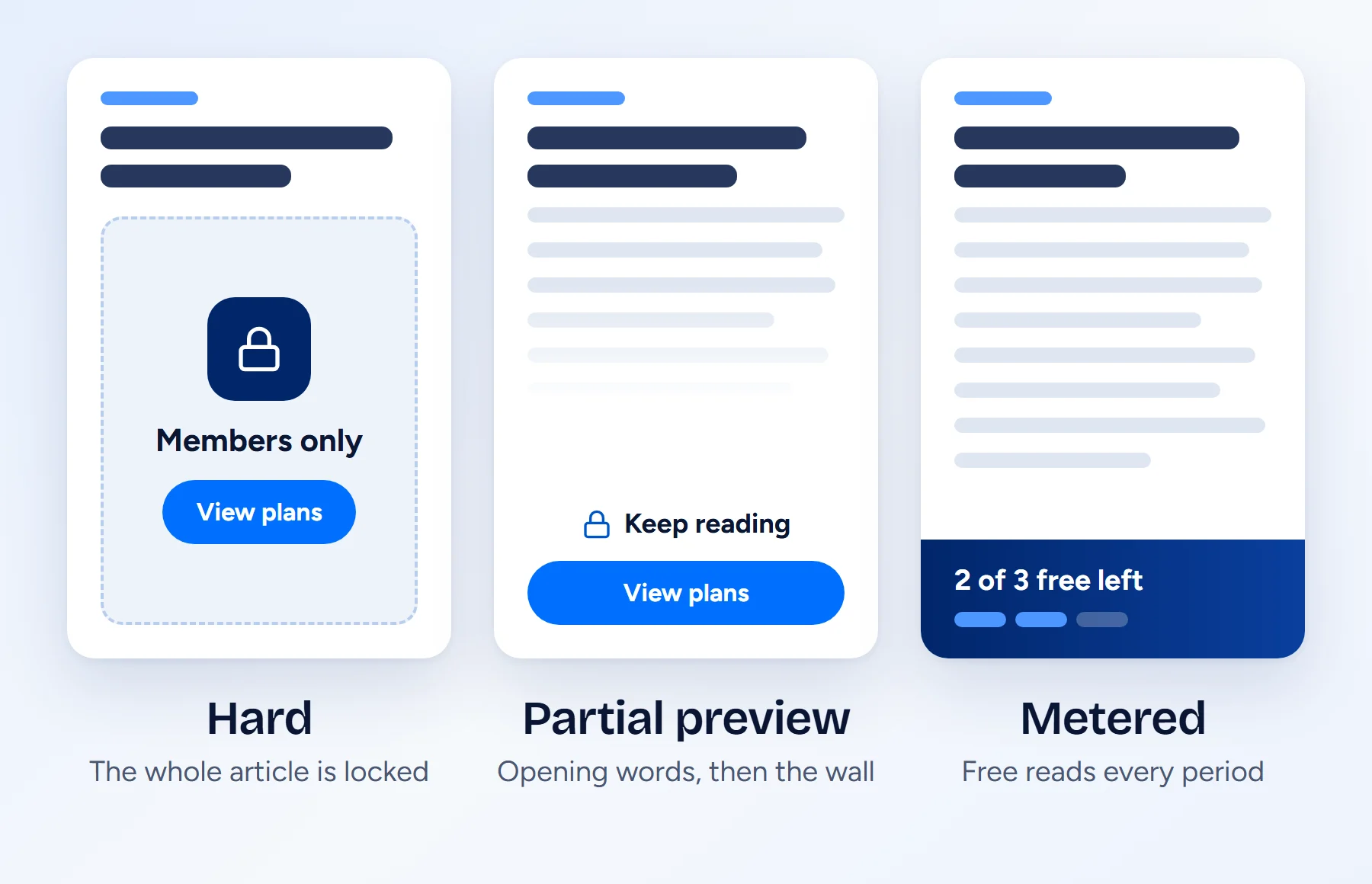
Three paywall styles, one setting
Decide how much of an article a visitor sees before the wall. Design presets and an accent colour make the paywall look like part of your site.
Plans are ordinary WooCommerce products
Sell fixed-duration passes or WooCommerce Subscriptions. Enter a price on the plan screen and the plugin creates the product. One click adds the pricing page and the members page.


Site licences for campuses and companies
Give a whole organisation a plan by IP address or e-mail domain, and reward paying members with shop discounts and gift links.
Know who reads and what converts
See every pass with its status, source and expiry, and follow readers from their first article to a purchase.

Free
No Pro version. Nothing locked.
Every feature on this page is in the free plugin on WordPress.org. There is no paid tier, no licence key and no upsell.
$0
Price, with every feature included
3
Paywall styles: hard, partial preview, metered
4
Reset periods: day, week, month, year
6
Shortcodes for content, pricing and account
31
Developer hooks: 22 filters and 9 actions
0
External services. It runs on your site.
Setup
Live in five steps
You need WordPress 6.6 or later, PHP 7.4 or later and WooCommerce 8.0 or later.
Activate WooCommerce
Plans are sold as WooCommerce products, so WooCommerce must be active.
Activate the plugin
Install Metered Content for WooCommerce from WordPress.org and activate it.
Publish a plan
Open Metered Content > Add Access Plan. Link a product, enter a price, or leave both empty for a free plan.
Create the pages
In Metered Content > Settings, click Create plugin pages to add the pricing and members pages.
Set the rules
Set global rules in Settings, or use the Content Access panel on individual posts.
Developers
Built to be extended
Six shortcodes place protected content, pricing tables and account panels anywhere. 22 filters and 9 actions let you change access rules, paywall markup, the visitor meter and more.
[wcmc_premium_content plan="pro"]Wraps content that only the listed plans can read
[wcmc_subscriber_only]Content that only members see
[wcmc_non_subscriber_only]Content for visitors without a plan
[wcmc_remaining_articles]The number of free articles the reader has left
[wcmc_pricing_table]Your plans with features, prices and checkout buttons
[wcmc_account]The reader’s plan, articles left and reading history
FAQ
Metered Content questions, answered
No. Metered Content for WooCommerce is free, and every feature on this page is included. There is no paid tier and no licence key.
Yes. Plans are sold as ordinary WooCommerce products, so WooCommerce must be active. A plan without a product is a free plan for every logged-in user.
The paywall’s View plans button opens your pricing page. Each plan’s button adds its product to the cart and goes straight to checkout. The order grants the plan when it reaches Processing or Completed, and the order received page links back to the article the reader was on.
Yes, optionally. When WooCommerce Subscriptions is installed, an active subscription to a plan product keeps the plan active. Without it, plans are fixed-duration passes.
Yes. Add IP addresses or ranges, or e-mail domains, under Organisation access on a plan. Readers on those addresses get the plan without buying it. Readers on an e-mail domain confirm their address once through a link sent by e-mail.
Yes. Set a store discount percentage under Member perks on a plan, optionally limited to product categories. Plan products and articles sold on their own are never discounted.
Metered articles for visitors, and premium articles while any plan has IP rules, are sent with no-cache headers. If your CDN ignores these headers, exclude premium articles from its cache.
Yes. It declares compatibility with WooCommerce custom order tables and the Cart and Checkout blocks.
No. Everything runs on your own site. Confirmation and reminder e-mails are sent through your site’s own mailer.
Put a meter on your articles today
Install the free plugin, publish a plan and create the pricing page. Your WooCommerce checkout does the rest.