
WordPress plugin · 100% free
Branded WooCommerce and WordPress emails, built with blocks
Email Customizer turns the plain emails your store sends into branded, mobile-friendly emails. Start from 58 ready templates, preview with a real order, send a test and publish. No code, and no Pro version.

Features
What you get with Email Customizer
Design the emails WooCommerce and WordPress send, in the block editor you already know.
Visual email builder
Edit emails with blocks and see the result as you type. No HTML and no template files.
58 ready email templates
A design for every WooCommerce and WordPress email, plus the Storefront collection and marketing designs.
Real store data, no placeholders
Order items with product photos, totals, addresses, recommended products and categories come from your shop.
Works with or without WooCommerce
Without WooCommerce it designs the 16 emails WordPress sends itself. With it, every store email too.
Mobile-friendly and client-safe
Table-based HTML with inline styles that looks right in Gmail, Outlook, Apple Mail and on phones.
Live preview and test emails
Preview any order on desktop and mobile, then send a test to any address.
Smart conditions
Send a different design by order status, country, customer role, products, coupon or language.
Dynamic merge tags
Insert the customer name, order number, totals, links and store details in text, buttons and links.
Subject line and preheader
Set your own subject and inbox preview text for every template, with merge tags.
At a glance
Email Customizer in numbers
One free plugin covers every email your site sends.


How it works
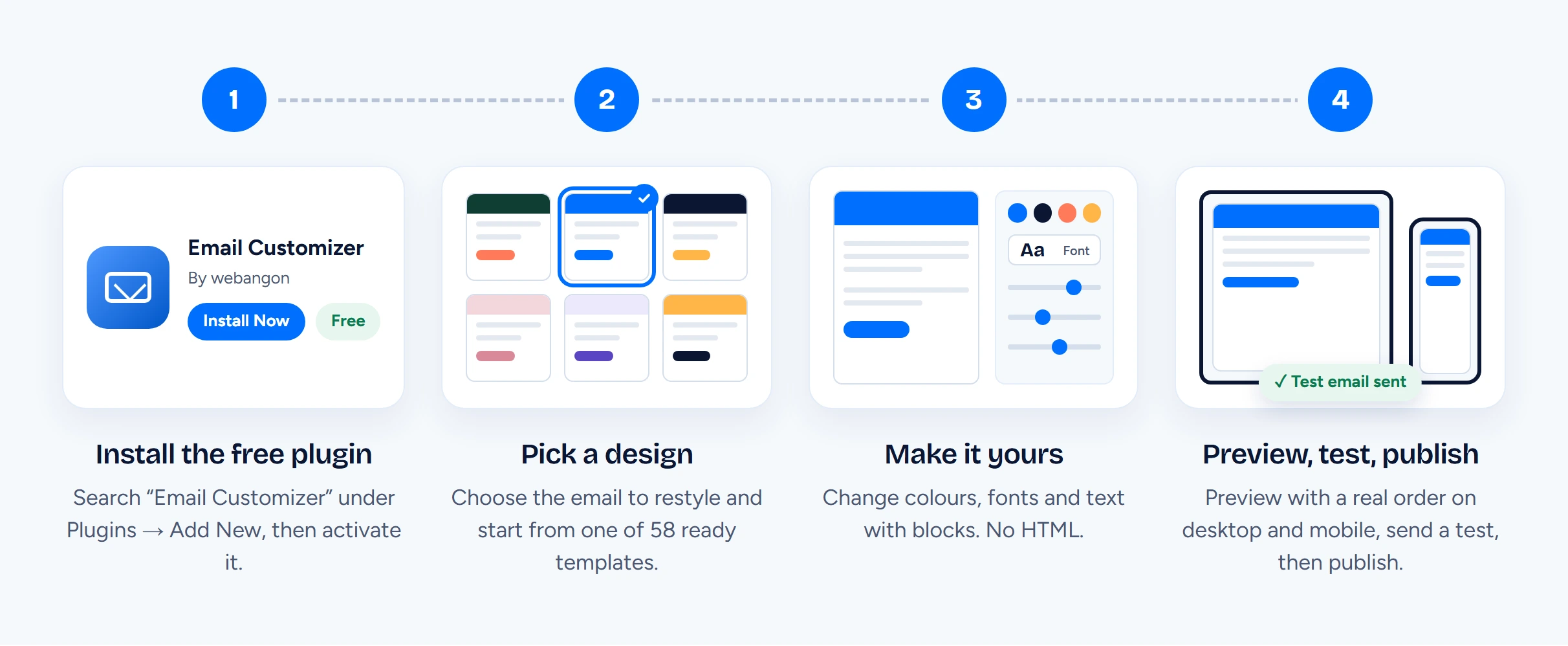
From plain to branded in four steps
Emails you have not designed keep going out exactly as before, so you can switch one email at a time.

Email blocks
25+ blocks made for email clients
Every block has settings for typography, colours, spacing, borders, backgrounds and alignment, with separate values for mobile.


Smart conditions
The right design for every order
Give each template conditions and a priority. When several templates match an email, the one with the highest priority is sent.


Emails
Every email your site sends, covered
Each of these 34 emails has its own ready design. Use it as it is or change anything.
WooCommerce emails
18 designs for customers and store admins.
WordPress emails
16 designs for the emails WordPress sends itself. WooCommerce is not needed.
Pricing
Free. There is no Pro version.
Every template, block and condition on this page is in the one plugin on WordPress.org. Nothing is locked and there is nothing to upgrade to.
Nothing locked
All 58 templates, all 25+ blocks, smart conditions, merge tags, live preview and test emails are included.
No licence key
Install it from Plugins → Add New and start designing. No account and no key to enter.
Open source
Released under the GPL on WordPress.org, so you can use it on as many sites as you like.
FAQ
Email Customizer questions, answered
No. Email Customizer is one free plugin. Every template, block and condition is included, with no licence key.
No. Without WooCommerce you can design the emails WordPress sends itself: account, password, comment and privacy emails. With WooCommerce active you can also design every WooCommerce email and use the order and product blocks.
Yes. Emails are built from tables with inline styles, the format email clients understand best, and they adapt to phone screens. Outlook on Windows shows square corners instead of rounded ones.
They are sent exactly as before. A template only replaces an email when it is published, enabled and assigned to that email.
Yes. Add conditions to a template, for example a design for orders from a certain country, for a product category or for first orders, and give each template a priority.
Yes. The payment instructions block prints what your payment gateways and tracking plugins add to WooCommerce emails, such as bank transfer details and tracking numbers.
Yes. Pick any order and any email type in the preview, switch between desktop and mobile, and send a test email to any address.
Yes. Use Save as preset in the editor and your design appears in the template library under My presets.
WooCommerce and WordPress go back to their default emails. Your templates and presets stay in the database, so they are there if you activate the plugin again.
Give your store emails a design
Install Email Customizer from WordPress.org, pick a template and send yourself a test. It is free, with no Pro version.
Version 1.0.0 · WordPress 6.5 or higher · PHP 7.4 or higher · WooCommerce optional